AIIA Service Call SOP
For managers preparing clients before their AIIA service call.
Why we have this SOP
Past sign-ups ran into problems because of missing apps, slow Wi-Fi, name mismatches on wires, clients trying to do things on their own, and clients using a spouse's or someone else's account on their own phone. This SOP prevents all of that.
- The person making the trades must use their own account on their own phone. No exceptions. No spouse's, family's, or friend's account.
- All DSJ codes and DSJ links must be acquired directly from BonChat. No forwarded codes or shared links from anyone else.
Why: breaking these rules can get the client's account frozen by BG Wealth or their benefits removed. Follow them exactly to protect every account.
Before You Send the Booking Link
Do all of these with the client BEFORE giving them the booking link:
- Help them install Coinbase, Telegram, and BonChat on their phone (not just computer — phone required).
- Coinbase must be installed using the AIIA referral link: https://coinbase.com/join/6AK7X8H?src=ios-link
- Help them create accounts + sign in to all three apps on their phone.
- Add them to the appropriate AIIA-managed Telegram group for their team / inviter (AIIA manages multiple groups — pick the right one for the client).
- Confirm the name matches exactly across: government ID, bank account, Coinbase account. (See Name Match below.)
- Tell them: wire transfer must include an extra 5% to cover fees.
- Tell them: the call takes 30–60 minutes.
- Tell them: don't click anything on their own during the call — wait for AIIA instructions every step.
- Warn them: if they try to set up on their own and break something, recovery is $50/hour.
- Explicitly explain the two hard no's from the background section above: (1) the person making trades must use their own account on their own phone — no exceptions, (2) all DSJ codes and links must be acquired directly from BonChat — no forwarded codes or shared links. Confirm the client verbally acknowledges both before booking.
Name Match (Required Before Wire)
The name on all three must match exactly:
- Government ID (driver's license or passport) — this is the final authority.
- Bank account name.
- Coinbase account name.
Wire Transfer (Complete BEFORE Sending Booking Link)
The wire transfer must be sent and confirmed before the client books the service call. The booking link is only sent once funds are on the way.
- Name on bank + Coinbase matches ID (Name Match above).
- Wire amount = the amount the client wants to fund their own DSJ account with, plus 5% extra to cover Coinbase fees. (The wire goes from the client's bank into the client's own Coinbase account to buy USDT — it does not pay AIIA.)
- Client handles the bank conversation. Manager can accompany but cannot speak for the client.
📸 How to Get Wire Info From Coinbase
Show these to the client on their phone, then have them take this info to their bank in person.
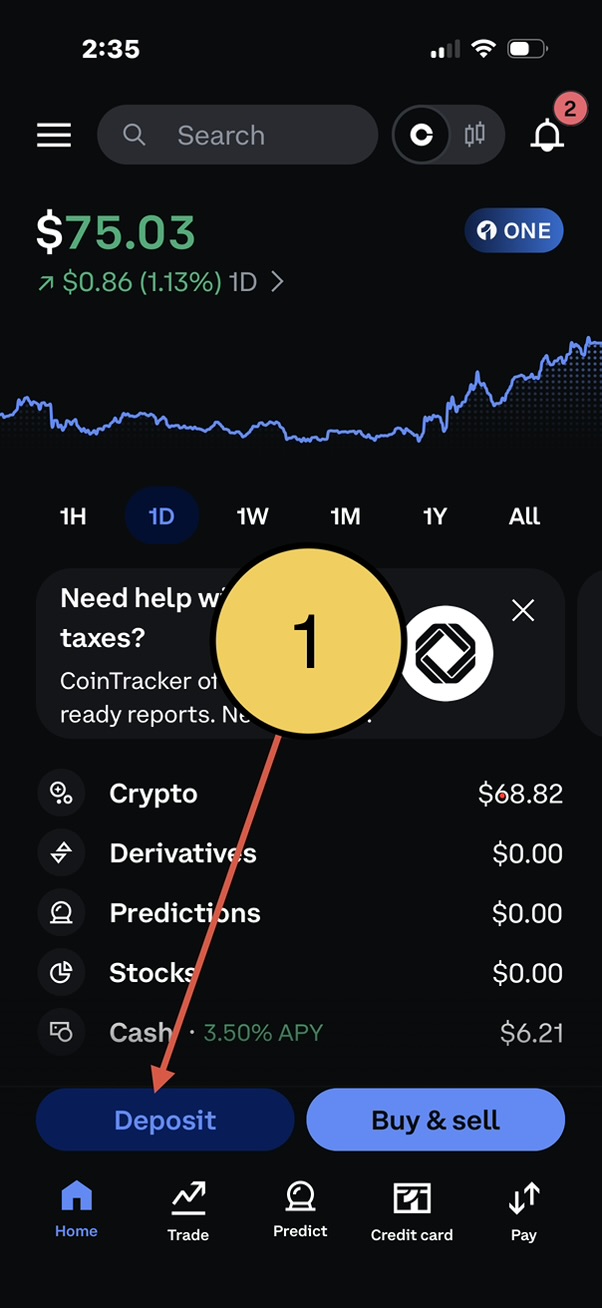
1. Tap Deposit on home screen.
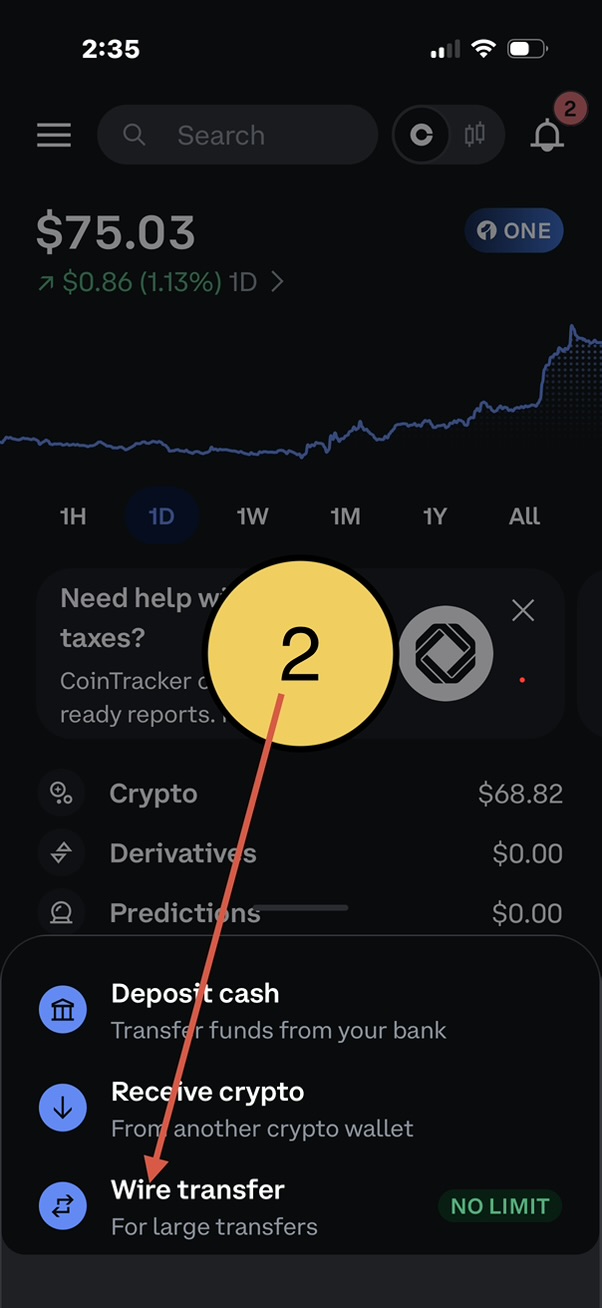
2. Tap Wire transfer (For large transfers).
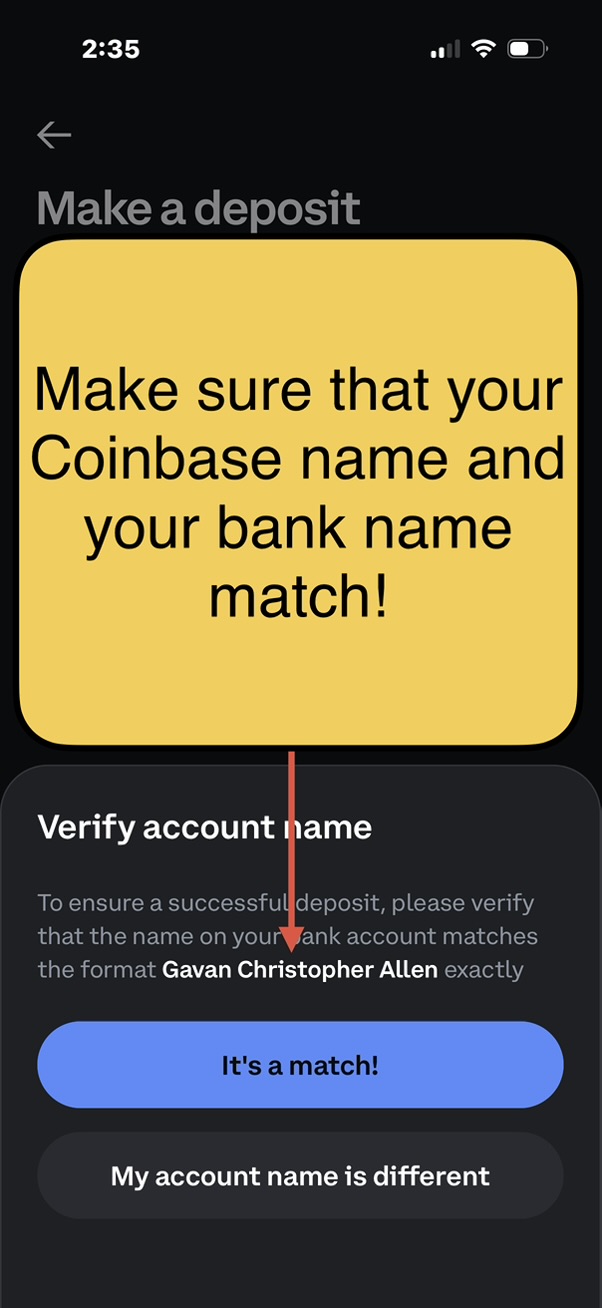
3. Verify Coinbase name matches bank name exactly. Tap It's a match!.
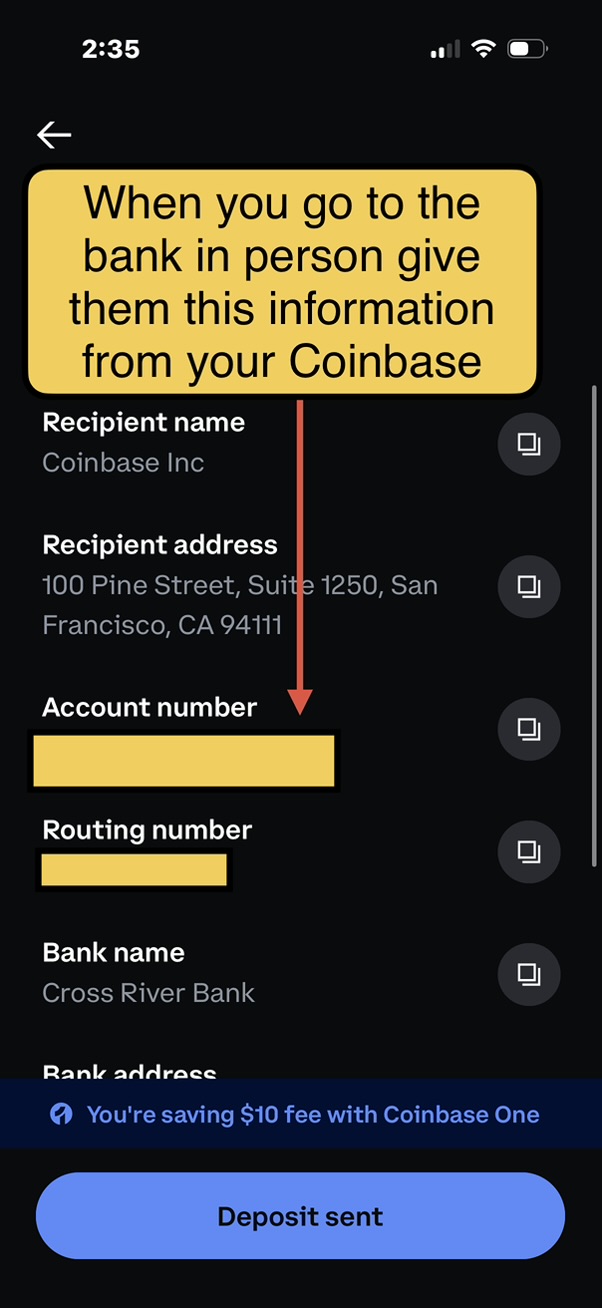
4. Take this info to the bank in person: Recipient name, address, account #, routing #, bank name.
Send the Booking Link (Only After Wire Is Initiated)
When all steps above are done, copy the booking link (bottom of page) and send it to the client so they book the appointment (not you).
The DSJ website link comes directly from AIIA — do not send it yourself.
No Self-Service Rule
Clients are not allowed to do account setup on their own. If they do it alone and run into problems, AIIA will charge $50 per hour to fix it (recovery calls, troubleshooting, coordinating with banks / Coinbase support).
Confirmation
Send the client this message:
Send them this link
https://calendly.com/byuhaiiaclub/aiia-service-call
Disclaimer: AIIA provides educational and consulting services only. AIIA is not a financial advisor, does not hold client funds, does not trade on behalf of clients, and is not responsible for trading losses or account issues. All trading and financial decisions are made solely by the client.
Privacy: Your personal information is stored securely and only used for scheduling AIIA services. We do not sell or share your data.